IOAI ML Notes Neural Network Deep Learning
Data Embeddings Embeddings for text, images, audio and structured data with practical usage notes.
19 February 2026
Syllabus Map
Overview
Embeddings map discrete or high-dimensional inputs into dense vectors that capture similarity and structure .
Good embeddings make downstream learning easier by placing related items closer in vector space.
This note summarises embeddings for text, images, audio, and structured data , plus practical tips.
Core Idea
An embedding is a learnable function f ( x ) → R d f(x) \rightarrow \mathbb{R}^d f ( x ) → R d
Similar inputs should have nearby vectors (cosine similarity or dot product).
Embeddings are usually trained jointly with a task or via self-supervision .
Sparse vs Dense Embeddings
Sparse Embeddings
Most dimensions are zero; only a small subset are non-zero.
Common examples: one-hot vectors, bag-of-words, and TF-IDF.
Usually high-dimensional, such as vocabulary-sized vectors.
Easy to interpret because each dimension maps to a specific token/feature.
x ∈ R V , ∥ x ∥ 0 ≪ V x \in \mathbb{R}^V,\quad \|x\|_0 \ll V x ∈ R V , ∥ x ∥ 0 ≪ V Dense Embeddings
Most dimensions contain non-zero values.
Common examples: Word2Vec, GloVe, BERT token embeddings, CLIP embeddings.
Usually lower-dimensional, such as d = 128 d=128 d = 128 d = 4096 d=4096 d = 4096
Harder to interpret directly, but better at capturing semantic similarity.
z = f ( x ) , z ∈ R d , d ≪ V z = f(x),\quad z \in \mathbb{R}^d,\quad d \ll V z = f ( x ) , z ∈ R d , d ≪ V Key Tradeoffs
Interpretability :
Sparse vectors are more human-readable.
Dense vectors are less interpretable but often more expressive.
Memory and compute :
Sparse vectors can be memory-heavy at very large vocab sizes.
Dense vectors are compact and efficient for neural models.
Generalisation :
Sparse methods treat tokens as mostly independent.
Dense methods share statistical strength across similar tokens/items.
Best use cases :
Sparse: classical IR/search baselines, small-data linear models.
Dense: semantic search, transfer learning, deep learning pipelines.
Practical Rule
Start with sparse features (for example TF-IDF) for a fast baseline.
Move to dense embeddings when you need semantic similarity, transfer, or multimodal alignment.
Text Embeddings
Tokenisation matters
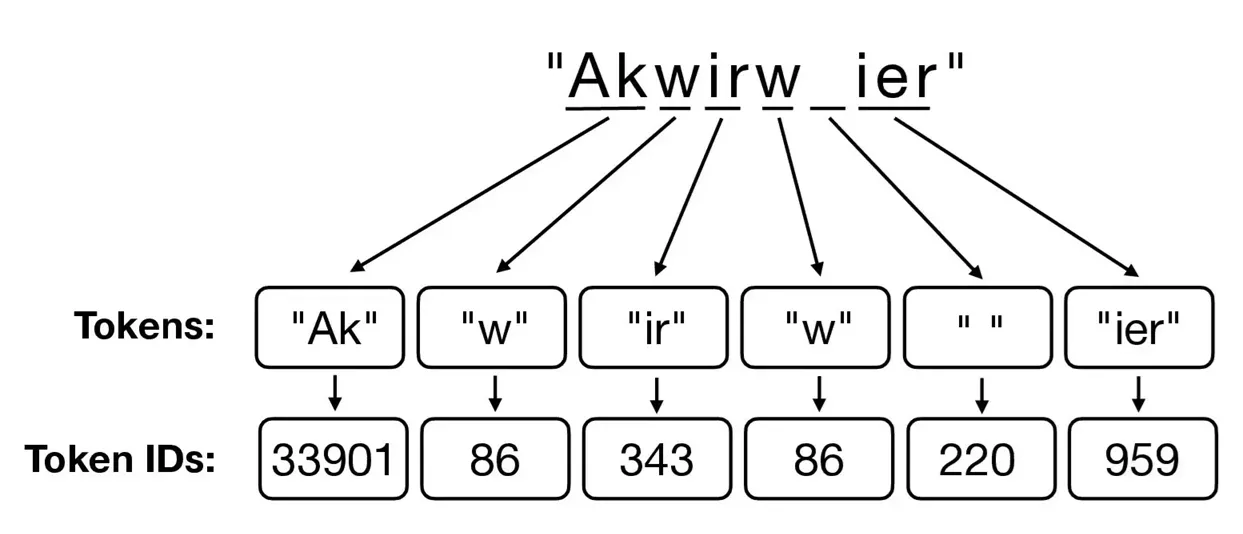
Word-level : simple but large vocab and OOV issues.Subword (BPE/WordPiece): handles OOV and morphology.Character : robust but longer sequences.
Static vs Contextual
Static (Word2Vec, GloVe, fastText): one vector per token.Contextual (BERT, GPT-style): token vector depends on surrounding words.
Training objectives
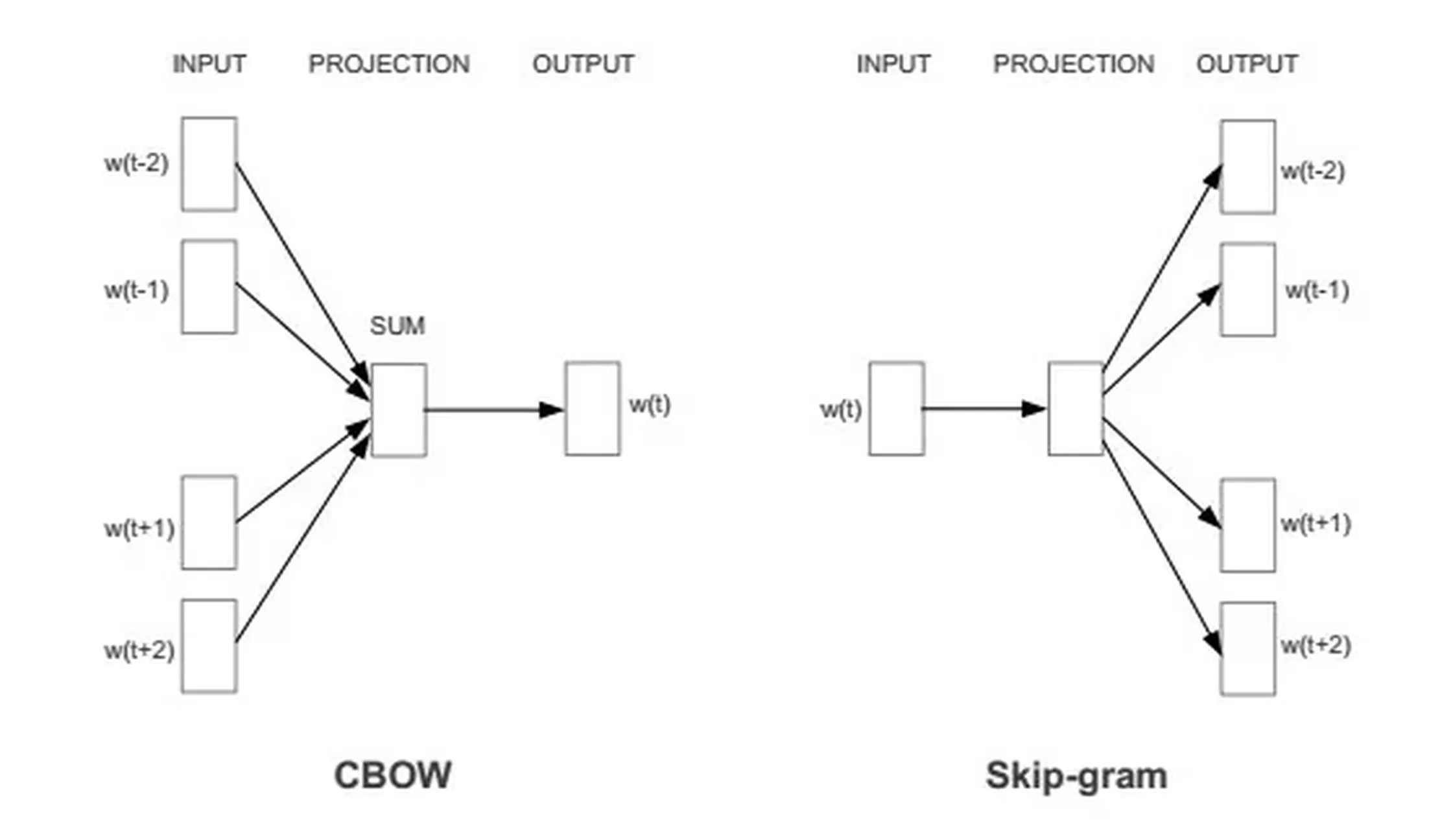
Skip-gram / CBOW : predict context words.Masked language modelling : predict masked tokens.Contrastive : pull positives together, push negatives apart.
Practical Notes
Default to cosine similarity for semantic comparisons
Cosine similarity is usually a strong first choice for embedding search and clustering.
Normalize before cross-batch dot-product comparisons
L2-normalization helps keep similarity scores stable across batches.
Use mean pooling as a sentence-level baseline
Averaging token embeddings is a simple and often competitive first approach.
BPE (Byte-Pair Encoding)
Core Idea
Start with characters, then repeatedly merge the most frequent adjacent pairs.
Why it works : frequent word fragments become subwords, so rare words can be built from pieces.
Steps
Step 1: Initialise the vocabulary
Build an initial vocabulary of characters plus a word boundary marker.
Represent each word as a sequence of characters.
Step 2: Count symbol pairs
Scan the corpus and count all adjacent symbol pairs .
Track the most frequent pairs across the full corpus.
Step 3: Merge the best pair
Merge the most frequent pair into a new symbol.
Add the new symbol to the vocabulary.
Step 4: Update the corpus
Replace all occurrences of the merged pair.
Recompute adjacent pairs on the updated corpus.
Step 5: Repeat until target size
Loop steps 2–4 until you hit the vocabulary budget.
Stop early if no merges are beneficial.
Step 6: Tokenise new text
Apply the learned merges in order.
Produce a sequence of subword tokens.
Strengths and Weaknesses
Strengths :
Controls vocabulary size.
Handles OOV by breaking into subwords.
Weaknesses :
Not probabilistic; merges are frequency-based only.
Can split words in unintuitive ways (e.g., im|port|ant).
When to use : strong default for modern NLP and LLM tokenisers.
WordPiece
Core Idea
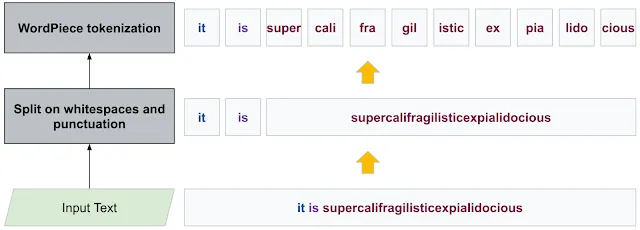
Like BPE but merges maximise likelihood of the training data.
Why it works : likelihood-driven merges favour subwords that explain the corpus well, so frequent patterns become stable tokens while rare words still decompose cleanly.
Steps
Step 1: Initialise the vocabulary
Start with characters and word boundary markers.
Represent each word as a sequence of characters.
Step 2: Score segmentations
Train a simple language model to score candidate segmentations.
Estimate likelihood for current token splits.
Step 3: Propose new subwords
Consider adding candidate subwords.
Measure likelihood improvement for each candidate.
Step 4: Add the best candidate
Add the subword that yields the largest likelihood gain .
Update the vocabulary.
Step 5: Re-tokenise the corpus
Re-segment the corpus with the updated vocabulary.
Recompute statistics for the next iteration.
Step 6: Repeat until target size
Continue steps 2–5 until you hit the vocabulary budget.
Stop early if gains are negligible.
Step 7: Tokenise new text
Apply longest-match-first subword matching.
Produce token sequences for the model.
Strengths and Weaknesses
Strengths :
Often yields more linguistically coherent subwords.
Common in BERT-family tokenisers.
Weaknesses :
Training is a bit more complex than BPE.
When to use : transformer models where stable, reusable tokenisers matter.
TF-IDF
Core Idea
Sparse vector for a document based on word frequency scaled by rarity.
Why it works : common words get down-weighted and informative, rare terms are emphasised, making documents easier to separate.
Steps
Step 1: Build the vocabulary
Extract terms from the corpus.
Optionally remove stopwords or apply stemming.
Step 2: Compute term frequency
For each document d d d
tf ( t , d ) = { 1 + lg count ( t , d ) if count ( t , d ) > 0 0 otherwise \text{tf}(t, d) =
\begin{cases}
1 + \lg \text{count}(t, d) & \text{if } \text{count}(t, d) > 0 \\
0 & \text{otherwise}
\end{cases} tf ( t , d ) = { 1 + lg count ( t , d ) 0 if count ( t , d ) > 0 otherwise
Use raw counts or log-scaled counts.
Term frequency (TF) :
Captures how frequent a term is within a document.
Higher TF suggests the term is more informative about that document.
Step 3: Compute document frequency
Count how many documents contain each term t t t
Store df ( t ) \text{df}(t) df ( t )
Document frequency (DF) :
df ( t ) \text{df}(t) df ( t ) t t t Rare terms (low df \text{df} df
Step 4: Compute inverse document frequency
idf ( t ) = log N df ( t ) + 1 \text{idf}(t) = \log\frac{N}{\text{df}(t) + 1} idf ( t ) = log df ( t ) + 1 N Use smoothing to avoid division by zero.
Inverse document frequency (IDF) :
Terms appearing in every document get weight near 0.
This helps for discrimination based on unique-ness
Step 5: Build TF-IDF vectors
tfidf ( t , d ) = tf ( t , d ) ⋅ idf ( t ) \text{tfidf}(t, d) = \text{tf}(t, d)\cdot \text{idf}(t) tfidf ( t , d ) = tf ( t , d ) ⋅ idf ( t ) Assemble a sparse vector per document.
Step 6: Normalise (optional)
L2-normalise vectors for cosine similarity.
Keep raw values for some classifiers.
Strengths and Weaknesses
What it captures : salience of words that are frequent in a document but rare overall.Strengths :
Fast, interpretable, strong baseline for retrieval and classification.
Weaknesses :
Ignores word order and context.
High-dimensional and sparse.
When to use : small/medium corpora, classical IR, or quick baselines.
Word2Vec
Core Idea
Learn dense word vectors from local context.
Steps (CBOW)
Step 1: Build training pairs
Slide a fixed window over text.
Use the context words as input and the centre word as target.
Step 2: Predict the centre word
Compute scores for all vocab terms.
Apply a softmax to get probabilities.
Step 3: Update embeddings
Increase the probability of the true centre word.
Decrease probabilities for incorrect words.
Steps (Skip-gram)
Step 1: Build training pairs
Slide a fixed window over text.
Use the centre word as input and each context word as target.
Step 2: Predict context words
Compute scores for context words.
Optimise the sum of log-probabilities.
Training tricks :
Negative sampling replaces full softmax with a few negative examples.Subsampling frequent words improves rare word quality.
Strengths and Weaknesses
Strengths :
Captures semantic similarity and analogies.
Weaknesses :
One vector per word (no context).
Struggles with polysemy.
When to use : quick static embeddings or as a baseline.
BERT (Contextual Embeddings)
Core Idea
Bidirectional transformer trained with masked language modelling.
Why it works : each token attends to both left and right context, yielding richer representations.
Steps (pretraining)
Tokenise with WordPiece.
Add special tokens ([CLS], [SEP]) and segment IDs.
Pretraining Step 2: Apply masking
Randomly mask a subset of tokens (e.g., 15%).
Replace some with [MASK], some with random tokens.
Feed the sequence into a bidirectional transformer .
Produce contextual hidden states for all positions.
Pretraining Step 4: Predict masked tokens
Use final hidden states to predict original tokens.
Compute masked language modelling loss.
Pretraining Step 5: Optional NSP objective
Predict whether sentence B follows sentence A.
Used in original BERT, removed in later variants.
Pretraining Step 6: Optimise
Update all weights to minimise total pretraining loss.
Steps (finetuning)
Finetuning Step 1: Add a task head
Classification, span prediction, or tagging head.
Use [CLS] or token-level embeddings as inputs.
Finetuning Step 2: Train on task data
Feed labelled data through the model.
Backpropagate task loss through all layers.
Finetuning Step 3: Tune for the task
Use a smaller learning rate and fewer epochs.
Optionally freeze lower layers for stability.
Strengths and Weaknesses
Output : each token embedding depends on its full context .Strengths :
Strong transfer performance; good for classification, QA, NER.
Weaknesses :
Heavier compute and memory.
Masked objective does not exactly match generation.
When to use : contextual tasks where nuance matters and compute is available.
GPT-Style (Autoregressive) Encodings
Core Idea
Unidirectional transformer trained to predict the next token.
Why it works : next-token prediction forces the model to build rich, contextual representations.
Steps (pretraining)
Tokenise text and build a causal attention mask.
Use a fixed context window.
Pretraining Step 2: Predict next tokens
For each position, predict the following token.
Compute cross-entropy loss over the vocabulary.
Pretraining Step 3: Optimise
Update all weights to minimise next-token loss.
Steps (finetuning)
Format prompts with instructions/examples.
Optionally add a task head for classification.
Finetuning Step 2: Train on task data
Optimise either supervised loss or instruction-tuned loss.
Strengths and Weaknesses
Output : each token embedding depends on left context only.Strengths :
Strong for generation and long-form text.
Scales well with data and compute.
Weaknesses :
No right context at training time.
Can be sensitive to prompting.
When to use : generation, summarisation, open-ended tasks.
Positional Embeddings
Models without recurrence need position information .
Why positions matter
Self-attention is permutation-invariant : without positions, token order is lost.
Position signals let the model distinguish “dog bites man” from “man bites dog”.
Absolute (Learned) Positions
Idea : A lookup table where each index is a position embedding.How it works :
Add or concatenate position vectors to token embeddings.
Train position vectors jointly with the model.
Pros : Simple and effective for fixed-length inputs.Cons : Does not extrapolate well beyond training length.
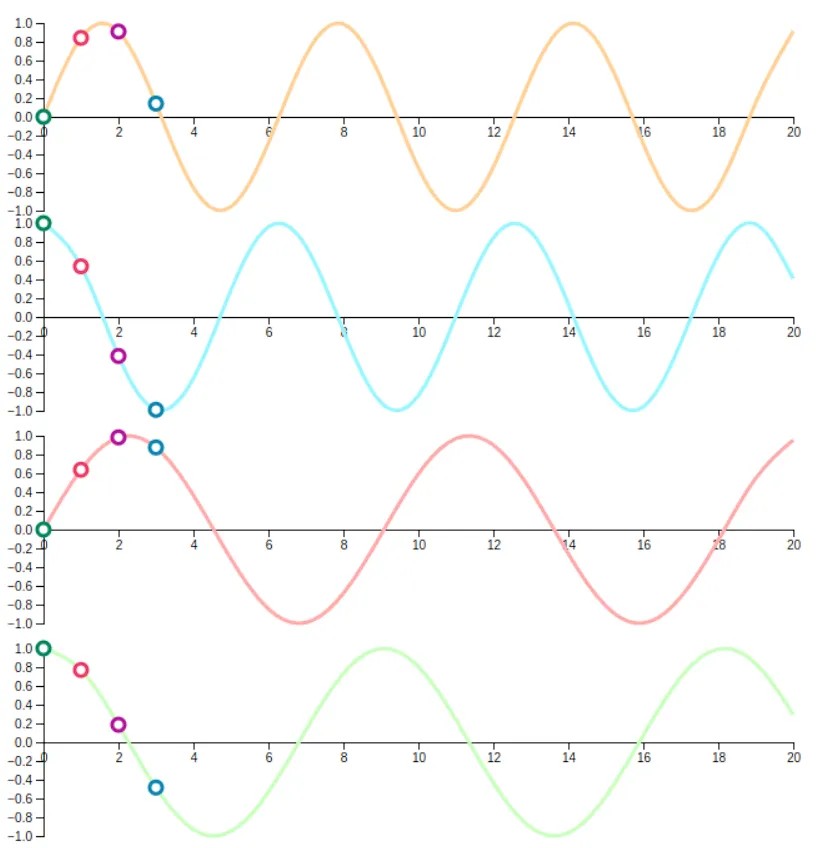
Sinusoidal Positions
Idea : Deterministic sine/cosine functions with different frequencies.How it works :
PE ( p o s , 2 i ) = sin ( p o s / 10000 2 i / d ) \text{PE}_{(pos,2i)} = \sin(pos / 10000^{2i/d}) PE ( p os , 2 i ) = sin ( p os /1000 0 2 i / d ) PE ( p o s , 2 i + 1 ) = cos ( p o s / 10000 2 i / d ) \text{PE}_{(pos,2i+1)} = \cos(pos / 10000^{2i/d}) PE ( p os , 2 i + 1 ) = cos ( p os /1000 0 2 i / d )
Pros : No extra parameters; can extrapolate to longer sequences.Cons : Slightly less flexible than learned embeddings.
Relative Positions
Idea : Encode distance between tokens instead of absolute index.How it works :
Modify attention scores based on relative offsets.
Bias attention toward nearer or specific relative positions.
Pros : Generalises better to longer inputs; captures local patterns.Cons : More complex to implement; adds compute.
Rotary Positional Encoding (RoPE)
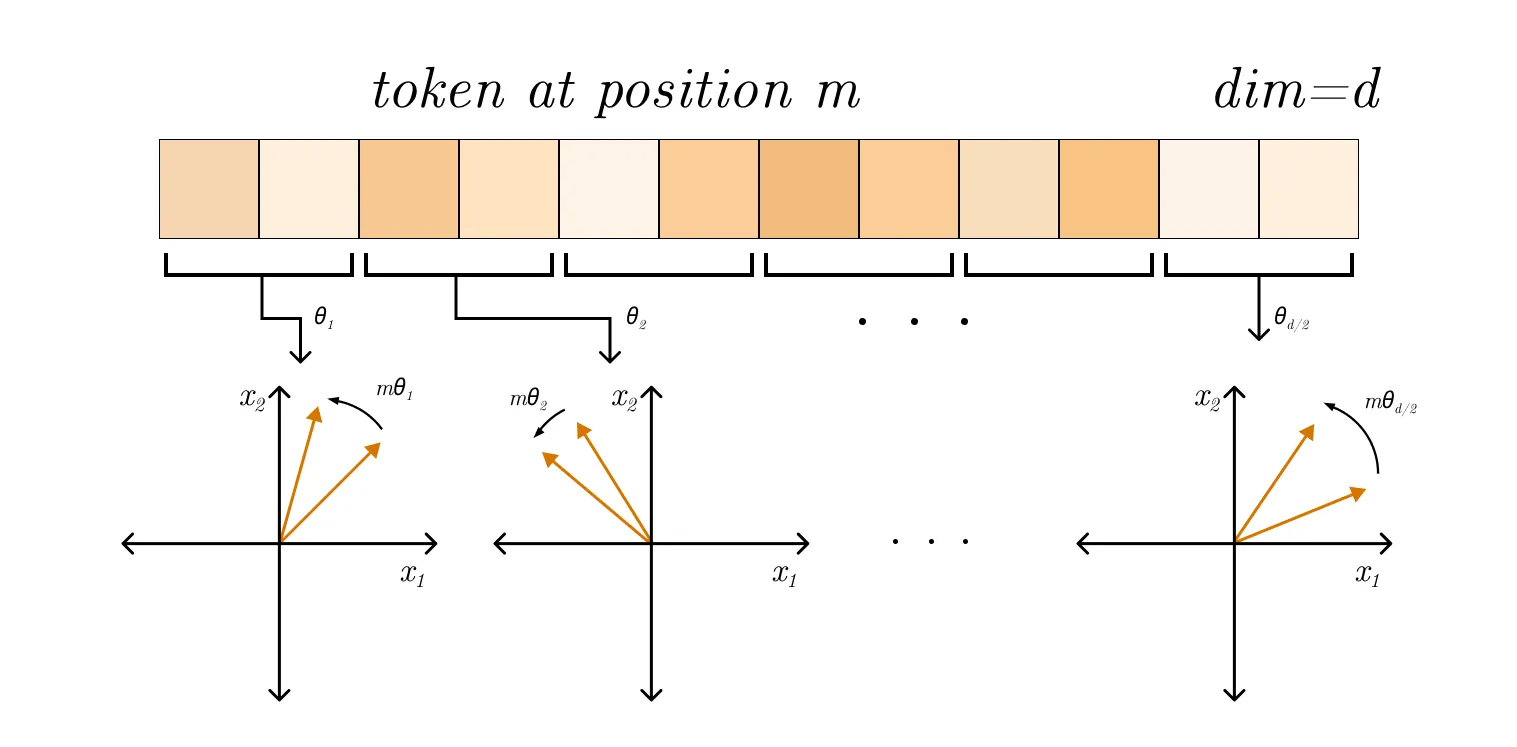
Idea : rotate query/key vectors by a position-dependent angle.Why it works : turns relative position into a rotation in vector space.Pros : Strong performance and extrapolation in practice.Cons : More specialised; can be sensitive to scaling choices.1D RoPE (for text) :
Rotate each 2D pair in the embedding using the token position.
Use different frequencies per pair.
ω \omega ω fixed frequency , not a trained parameter.Each pair gets a different ω \omega ω
RoPE 1 D ( q ) = R ( θ p o s ) q \text{RoPE}_{1D}(q) = R(\theta_{pos}) q RoPE 1 D ( q ) = R ( θ p os ) q R ( θ ) = [ cos θ − sin θ sin θ cos θ ] , θ p o s = p o s ⋅ ω R(\theta)=
\begin{bmatrix}
\cos\theta & -\sin\theta \\
\sin\theta & \cos\theta
\end{bmatrix},
\quad
\theta_{pos} = pos \cdot \omega R ( θ ) = [ cos θ sin θ − sin θ cos θ ] , θ p os = p os ⋅ ω Practical Notes
Choose add vs concat based on model budget
Adding positional signals keeps dimensionality fixed, while concatenation increases it.
Use learned 2D positions for ViT patch tokens
Learned 2D positional embeddings are a common and effective default in vision transformers.
Prefer relative or RoPE-style methods for long context
Relative/rotary schemes usually extrapolate better than basic absolute embeddings.
Image Embeddings
Common approaches
CNN features : global average pooled activations.Vision Transformers : patch embedding + positional embeddings.CLIP-style : map images and text into a shared space.
CNN Feature Embeddings
Idea : use intermediate or pooled CNN activations as image vectors.How it works :
Pass image through a pretrained CNN.
Take the last conv block features and apply global average pooling.
See also : Pre-trained Vision Encoders Strengths :
Strong for textures and local patterns.
Works well with limited data via transfer learning.
Weaknesses :
Limited global context vs transformers.
When to use : fast baselines, small datasets, edge deployment.
Idea : split image into patches and treat each as a token.How it works :
Flatten P × P P \times P P × P
Project to embedding dimension and add positional embeddings.
Use the [CLS] token (or pooled tokens) as the image embedding.
See also : Pre-trained Vision Encoders Strengths :
Captures global context well.
Scales with data and compute.
Weaknesses :
Data-hungry without pretraining.
When to use : large datasets or strong pretrained backbones.
CLIP-Style Multimodal Embeddings
Idea : train image and text encoders to align in a shared space.How it works :
Encode images and captions.
Use contrastive loss to pull matching pairs together.
Strengths :
Zero-shot classification and retrieval.
Flexible across domains with text prompts.
Weaknesses :
When to use : retrieval, open-vocabulary classification, multimodal tasks.
CLIP (Step-by-Step)
Step 1: Build image-text pairs
Collect paired data ( I i , T i ) (I_i, T_i) ( I i , T i )
In each batch, matched pairs are positives; non-matching pairs act as negatives.
Step 2: Encode each modality
Pass image I i I_i I i u i u_i u i
Pass text T i T_i T i v i v_i v i
Step 3: Project into shared space
Map both outputs to the same embedding dimension with learned projection heads.
L2-normalize vectors so cosine similarity is a dot product:
u ~ i = u i ∥ u i ∥ , v ~ i = v i ∥ v i ∥ \tilde{u}_i=\frac{u_i}{\|u_i\|},\quad \tilde{v}_i=\frac{v_i}{\|v_i\|} u ~ i = ∥ u i ∥ u i , v ~ i = ∥ v i ∥ v i Step 4: Compute similarity matrix
For a batch of size N N N
s i j = u ~ i ⊤ v ~ j τ s_{ij}=\frac{\tilde{u}_i^\top \tilde{v}_j}{\tau} s ij = τ u ~ i ⊤ v ~ j
τ \tau τ
Step 5: Optimize contrastive loss
Train with symmetric contrastive objectives:
image-to-text: image i i i i i i
text-to-image: text i i i i i i
This pulls matched pairs together and pushes mismatched pairs apart.
Step 6: Use for inference
Zero-shot classification : encode class prompts and pick the class with highest similarity to image embedding.Retrieval : nearest-neighbor search between image and text embeddings in shared space.
Self-Supervised Vision Embeddings
Idea : learn embeddings without labels using pretext tasks.Methods :
Contrastive (SimCLR, MoCo).
Masked image modelling (MAE, BEiT).
Strengths :
Strong transfer performance.
Reduces reliance on labels.
When to use : label-scarce domains or foundation model pretraining.
Practical Notes
Start with linear probing for transfer setup
Pretrained image encoders often perform strongly with a lightweight linear head.
Normalize embeddings for retrieval
L2-normalization is typically required for stable nearest-neighbor similarity search.
Audio Embeddings
What the model sees (representations)
Raw waveform : 1D signal at 16k/44.1k Hz. Preserves phase and fine timing.Spectrograms : 2D time-frequency grids via STFT.Log-mel spectrograms : compress frequency with mel filters and log amplitude. Strong default.MFCCs : decorrelated log-mel features; often used in classical pipelines.
Typical pipeline
Frame the waveform into overlapping windows (e.g., 25 ms with 10 ms hop).
Convert to frequency domain (STFT) and apply mel filterbank.
Log-scale and optionally mean-variance normalise.
Feed to encoder and pool to a fixed-length embedding.
Encoder families
CNNs over spectrograms :
Treat time-frequency as an image.
Convolutions learn local patterns like harmonics and onsets.
Pooling reduces time/frequency resolution to build invariance.
CRNNs (CNN + RNN) :
CNN extracts local features, RNN aggregates temporal dynamics.
Good when sequence order matters (speech, music phrases).
Transformers :
Use patching or strided convs to create tokens.
Self-attention captures long-range temporal structure.
Waveform models :
1D conv stacks or transformer encoders on raw audio.
Avoids hand-crafted features but needs more data.
Training objectives (how embeddings are learned)
Supervised : classify speaker, instrument, genre, scene, keyword.
Embedding is taken from a pre-logit layer for transfer.
Contrastive :
Pull together different augmentations of the same clip.
Push apart unrelated clips in a batch (InfoNCE-style).
Self-supervised predictive :
Predict future frames or masked segments.
Forces the model to capture temporal structure.
Metric learning :
Triplet loss for speaker verification or audio search.
Pooling to a fixed vector
Mean / max pooling over time: fast and effective baseline.Attention pooling : learn weights for important frames.NetVLAD / statistic pooling : aggregate with richer summary stats.Pooling choice controls whether embeddings capture global content or salient moments .
Augmentations that matter
Time shift / crop : robustness to alignment.Additive noise / reverb : robustness to environment.Time stretch / pitch shift : invariance to tempo or pitch.SpecAugment : time/frequency masking on spectrograms.
Practical Notes
Use a strong audio front-end baseline first
Log-mel spectrograms at 16 kHz with 64-128 mel bins are a reliable default.
Keep normalization policy consistent
Per-clip or per-dataset normalization can work, but train/inference mismatch hurts transfer.
Match embedding post-processing to objective
Retrieval usually benefits from L2-normalized vectors; classification can work with raw embeddings.
Watch for shortcut features
Background noise and microphone artifacts can leak label information and inflate metrics.
Evaluate robustness under domain shift
Include out-of-domain and noisy benchmarks, not only in-domain test splits.
Structured Data Embeddings
Categorical features
Use embedding tables instead of one-hot for large vocabularies.
Rare categories can be bucketed into UNK.
Numerical features
Standardise inputs before feeding into MLPs.
Optionally embed via piecewise linear or bucket embeddings .
Mixed data
Concatenate numerical features with categorical embeddings.
Use feature crossing only when necessary to reduce complexity.
Graph Embeddings (Brief)
Node embeddings via message passing (GCN, GAT).
Graph-level embeddings via pooling (mean, sum, attention).
Contrastive objectives work well for self-supervised graph learning.
How To Choose Embedding Size
Too small: underfits, loses nuance.
Too large: overfits, slower, harder to regularise.
Rules of thumb :
Small vocab (<1k): 16–64 dims.
Medium (1k–100k): 64–256 dims.
Large (>100k): 256–1024 dims.
Validate with downstream performance and memory budget .
Practical Tips
Normalise for retrieval tasks; keep raw for classification unless needed.For nearest-neighbour search, use approximate indexes (FAISS, HNSW).
Freeze vs finetune : freeze when data is small, finetune when domain shifts.Monitor for embedding collapse (all vectors become similar).
PyTorch Examples
import torch import torch.nn as nn # Token embeddings tok_emb = nn.Embedding( num_embeddings = 30000 , embedding_dim = 256 ) # Positional embeddings (learned) pos_emb = nn.Embedding( num_embeddings = 512 , embedding_dim = 256 ) # Categorical feature embedding city_emb = nn.Embedding( num_embeddings = 1000 , embedding_dim = 32 ) # Simple sentence embedding: mean pooling tokens = torch.randint( 0 , 30000 , ( 8 , 32 )) # batch, seq emb = tok_emb(tokens) sent_emb = emb.mean( dim = 1 )