Syllabus Map
- Study map: Syllabus Study Map
Overview
- Convolutions extract local spatial patterns.
- Stacking layers builds hierarchical visual features.
- Residual connections help train deeper CNNs by improving gradient flow.
Convolution Basics
Core Idea

- Apply a learnable filter across the image.
- Capture edges, textures, and shapes.
- Weight sharing reduces parameters and improves translation robustness.
Key Concepts
Kernels


- A kernel is a small window of learnable weights.
- It slides across the input to detect local patterns.
- Kernel size controls how much context the filter sees.
Stride

- Controls how far the kernel moves each step.
- Larger stride reduces spatial resolution.
Padding

- Adds border pixels to preserve spatial size.
- Helps retain edge information.
Output size
-
Depends on input size, kernel size, stride, and padding.
-
Use the formula below to compute and .
-
For input size :
- : input height and width.
- : kernel size (assume square kernel for simplicity).
- : padding size on each side.
- : stride.
- : output height and width.
Channels and feature maps
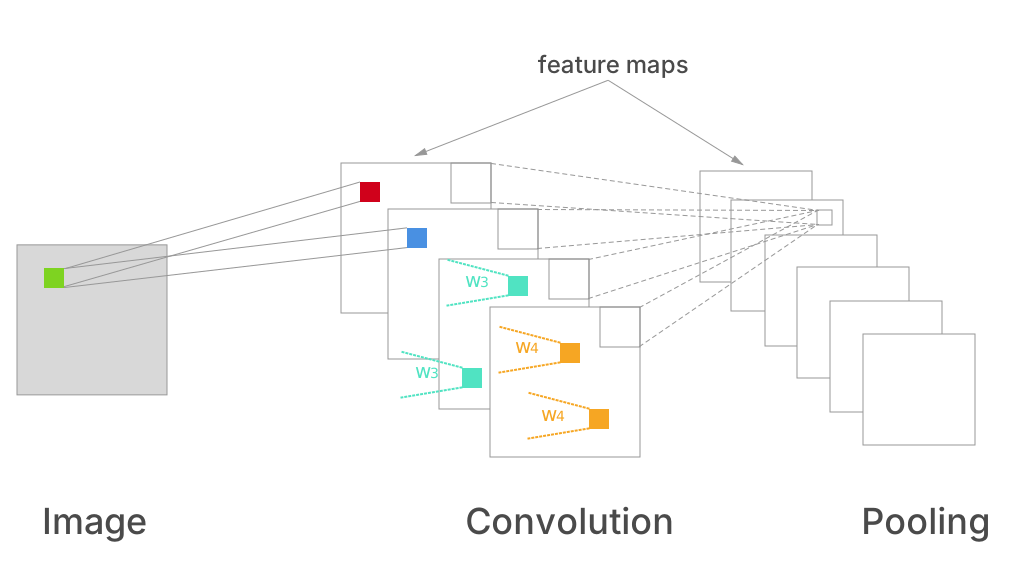
- Input channels match the input (e.g., 3 for RGB).
- Output channels are different learned filters.
- Each output channel is a feature map highlighting a pattern.
Convolution operation
- For input and kernel :
- : output value at spatial location .
- : kernel weight at offset .
- : input value under the kernel at position .
- The sum is over the kernel window offsets .
CNN Overview (General Structure)
Typical pipeline
- Input image (H × W × C).
- Stem: conv + norm + activation to get early edges/textures.
- Stages: repeated conv blocks with occasional downsampling (stride or pooling).
- Head: global pooling + linear classifier (or task-specific heads).
Spatial hierarchy
- Early layers: edges and corners.
- Mid layers: textures and parts.
- Deep layers: objects and semantics.
CNN vs Fully Connected (FC)
Why CNNs dominate for images
- Local connectivity: filters see small neighborhoods first.
- Weight sharing: same filter across the image cuts parameters.
- Translation tolerance: same pattern can be detected anywhere.
- Parameter efficiency: FC layers explode in size for high-res inputs.
When FC makes sense
- Small, fixed-size tabular inputs.
- As a final classifier head after convolutional features.
Residual Connections
Core idea
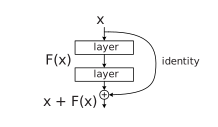
- Residual blocks add the input back to the output:
- This helps gradients flow and enables very deep networks.
Why residual learning helps
- Degradation problem: very deep plain CNNs can have higher training Error than shallower ones.
- Learning a residual is often easier than learning a full mapping directly.
- If the optimal mapping is close to identity, then and the residual , which is easier to optimise.
Identity vs projection shortcuts
- Identity shortcut: (same shape).
- Projection shortcut: use conv to match channels/stride:
- .
- Used when changing resolution or channel count.
Gradient flow
- Skip connections create short paths for gradients.
- They reduce vanishing gradients but do not eliminate them completely.
- Optimisation becomes easier even if generalisation stays similar.
PyTorch Implementation
Core building blocks
import torch
import torch.nn as nn

conv = nn.Conv2d(in_channels=3, out_channels=32, kernel_size=3, stride=1, padding=1)
bn = nn.BatchNorm2d(32)
relu = nn.ReLU()
pool = nn.MaxPool2d(kernel_size=2, stride=2)
A simple CNN block
class ConvBlock(nn.Module):
    def __init__(self, in_ch, out_ch):
        super().__init__()
        self.net = nn.Sequential(
            nn.Conv2d(in_ch, out_ch, 3, padding=1),
            nn.BatchNorm2d(out_ch),
            nn.ReLU(),
            nn.MaxPool2d(2)
        )

    def forward(self, x):
        return self.net(x)
Residual block (basic)
class ResidualBlock(nn.Module):
    def __init__(self, channels):
        super().__init__()
        self.conv1 = nn.Conv2d(channels, channels, 3, padding=1)
        self.bn1 = nn.BatchNorm2d(channels)
        self.conv2 = nn.Conv2d(channels, channels, 3, padding=1)
        self.bn2 = nn.BatchNorm2d(channels)
        self.relu = nn.ReLU()

    def forward(self, x):
        out = self.relu(self.bn1(self.conv1(x)))
        out = self.bn2(self.conv2(out))
        return self.relu(out + x)
Dataset processing (PyTorch)
Basic image dataset
from torchvision import datasets, transforms

transform = transforms.Compose([
    transforms.Resize((224, 224)),
    transforms.ToTensor(),
    transforms.Normalize(mean=[0.485, 0.456, 0.406],
                         std=[0.229, 0.224, 0.225])
])

train_ds = datasets.ImageFolder("data/train", transform=transform)
val_ds = datasets.ImageFolder("data/val", transform=transform)
DataLoader
from torch.utils.data import DataLoader

train_loader = DataLoader(train_ds, batch_size=32, shuffle=True, num_workers=2)
val_loader = DataLoader(val_ds, batch_size=32, shuffle=False, num_workers=2)